Greetings, JavaScript coders! Shivansh Rajbhar here once again. We've grasped data types and operators. Now, let's steer our JavaScript programs using control flow!
Conditional Statements: Making Informed Decisions
Imagine you're standing at a clothing store checkout. The cashier (the if statement) checks a condition: "Is the customer (your program) 18 years old or older?" (This condition can be true or false). Based on the result:
if(true): The customer qualifies for a discount (your code executes a specific block of statements).else(false): The customer doesn't get a discount (your code executes a different block of statements).
This is the essence of conditional statements:
let age = 25; // Replace with your actual age

if (age >= 18) {
  console.log("You are eligible to vote!");
} else {
  console.log("Sorry, you must be 18 or older to vote.");
}
Real-World Example: Age Eligibility
In this code, the if statement checks if the age variable is greater than or equal to 18. If true, the program displays a message indicating voting eligibility. If false, it displays a message stating the age requirement.
Loops: Repetition Made Easy
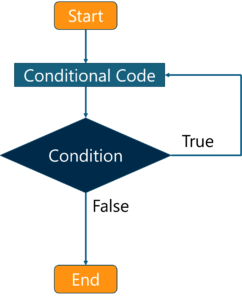
Imagine you're baking cookies. You need to repeat several steps (mixing ingredients, baking, etc.) a certain number of times (say, 12 cookies). Loops streamline this process by allowing you to execute a block of code multiple times:
for (let i = 1; i <= 12; i++) {
  console.log("Baking cookie number", i);
}
Real-World Example: Baking Cookies
This code uses a for loop. The variable i acts as a counter, starting at 1 and incrementing by 1 until it reaches 12 (the number of cookies). In each iteration, the loop displays the current cookie number being baked.
Beyond the Basics: while and do-while Loops
While for loops are great for predefined repetitions, JavaScript offers additional loop options:
whileloops: Continue executing the code block as long as a certain condition remains true.do-whileloops: Execute the code block at least once, then continue as long as the condition is true.
Think of them like variations on the "repeat until" theme, depending on whether the initial execution is crucial or not.
Switch Statements: Handling Multiple Conditions Efficiently
Imagine you're working at a restaurant. A customer orders a meal (the variable choice). You use a switch statement to handle different meal options:
let choice = "pizza"; // Replace with your meal choice

switch (choice) {
  case "pizza":
    console.log("Making a delicious pizza!");
    break;
  case "burger":
    console.log("Grilling up a juicy burger!");
    break;
  case "pasta":
    console.log("Preparing a delightful pasta dish!");
    break;
  default:
    console.log("Sorry, that option is not available.");
}
Real-World Example: Restaurant Order
The switch statement checks the value of the choice variable. If it matches a specific case ("pizza", "burger", or "pasta"), the corresponding code block is executed. The default case handles any unmatched choices.
To sum up, the fundamental building blocks of dynamic JavaScript programming are control flow structures. You may enable your programs to respond to a variety of user inputs, repeat jobs effectively, and make judgments by becoming proficient with conditional statements, loops, and switch statements. We'll go into more detail on each control flow principle with further examples and real-world applications in the following post. So pay attention and get ready to unleash your JavaScript code's full potential!
Comments
Post a Comment